


Sooo, is AI really taking over translations?
Well, not quite yet. At least, not 100 percent.
If you run a WordPress site, you’ve probably asked yourself whether to translate your content manually or let AI tools like DeepL do the job for you. Both can work beautifully when used wisely. It all depends on your goals, your budget, and how much control you want over the final result.
Translation is not just about changing words. It is about helping people understand you, trust you, and connect with your brand. A poor translation can make visitors leave your site in seconds. A great one can open new markets and boost your business.
In this guide, you will learn:
• The pros and cons of manual and automatic translation
• How to choose the right method based on your project, budget, and language skills
• How to estimate your real translation costs using both methods
Let’s jump right in.
Manual vs machine vs hybrid translation
Manual translation offers accuracy; machine translation offers speed and lower costs; and hybrid translation combines both for the best balance. We’ll explore each method to help you choose the right one for your project.
What is manual translation?
Manual translation means a human translator (you, your team, or a professional) adapts your content word by word to make sure it’s accurate in several languages.
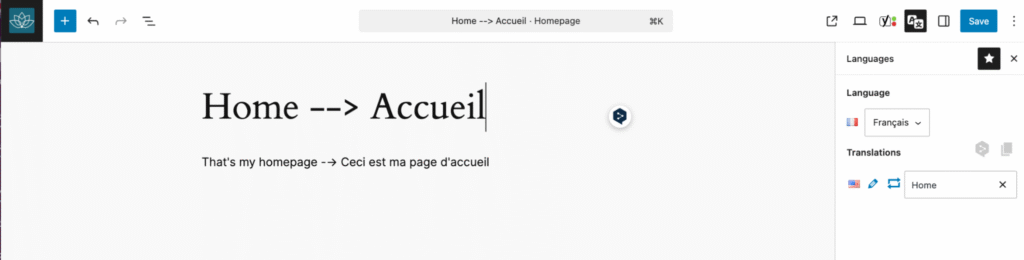
Pros of manual translation
- It’s the highest accuracy and natural tone.
- It brings a consistent brand voice.
- It adapts idioms, culture, and humor.
When manual translation is the best
Manual translation works best for content that reflects your brand and needs a natural, human tone. This includes marketing pages, blog articles, product descriptions, reviews, legal texts, and educational materials where accuracy and style really matter.
Cons of manual translation
- It takes longer to produce.
- It costs more per word.
- It requires language expertise or external support.
- When your content changes, sending updates to translators by spreadsheet, waiting for revisions, and pasting everything back into WordPress can quickly become time-consuming.
| 💡 Hint: Polylang Pro helps you streamline manual translation with its XLIFF import/export feature. XLIFF is a standard format used by translators to export, translate, and reimport text efficiently, no more spreadsheets or copy-paste. Everything automatically goes back to the right place in WordPress. |
What is Automatic Translation?
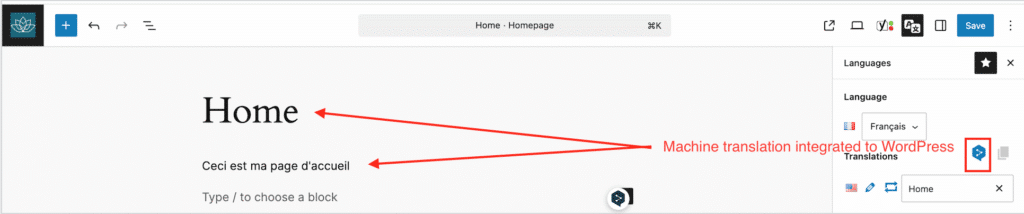
Automatic (machine) translation utilizes artificial intelligence to translate text instantly. Popular AI tools include DeepL, Google Translate, Microsoft Translator, and Amazon Translate. Here’s an example of DeepL integration with Polylang Pro, so that you can use machine translation directly from WordPress:
Pros of machine translation
- It provides instant translation, which saves you time.
- It’s cheap and sometimes, even free.
- It’s easy to scale for large sites and upcoming content, as it’s added directly in the interface.
When AI works the best
AI translation is highly effective for straightforward, factual content such as product descriptions.
For example: “Check out our grey sofa for four people, entirely washable.” This type of copy is clear and neutral, allowing AI to perform well.
Cons of machine translation
- There is less nuance or emotional depth, which can sound robotic or awkward.
- AI struggles with tone, humor, and wordplay.
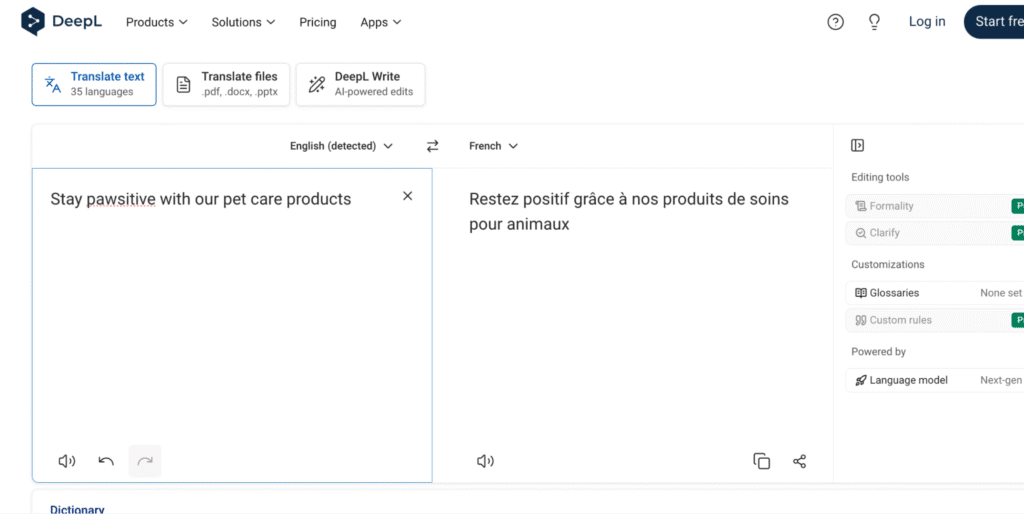
Example: Take the slogan “Stay pawsitive with our pet care products.” DeepL would translate it as “Restez positif avec nos produits pour animaux.”
The pun and friendly tone vanish completely. The slogan will sound meaningless when translated automatically into French:
Your quick reference: Manual vs automatic vs hybrid translation
Here’s a summary table that can help you decide which type of translation you want to go with:
| Criteria | Manual Translation | Machine Translation (AI) | Hybrid Translation (Possible with |
| Definition | Human translators adapt your content word by word, ensuring accuracy, tone, and cultural nuance | AI tools like DeepL or Google Translate instantly translate text with no human input | Combination of AI translation with human review for accuracy, localization, and transcreation |
| Does Polylang Pro offer it? | Yes | Yes | Yes |
| Time Investment | High | Instant | Fast setup with later refinement (but depends on review scope) |
| Accuracy | Excellent and natural | Good for factual text, weaker for tone or humor | High, after human editing and localization |
| Tone & Style | Fully adapted to your brand voice through transcreation | Can sound robotic or inconsistent | Balanced tone that feels natural and localized |
| Cost | Highest (paid per word) | Lowest (often per character or free) | Moderate, depending on how much content is manually reviewed |
| Best For | Marketing, storytelling, legal, and creative content | Technical pages, large catalogs, or product data | Website owners who want fast translation that remains reviewed and finalized by humans |
The hybrid solution with Polylang Pro: the best of both worlds
If you want an easy, WordPress-native way to go multilingual, Polylang Pro offers the perfect balance of power and simplicity.
Polylang Pro provides a hybrid approach that combines the efficiency of machine translation with the accuracy of human review. First, you automatically translate your entire site, then manually refine your pages. Here’s how to do it:
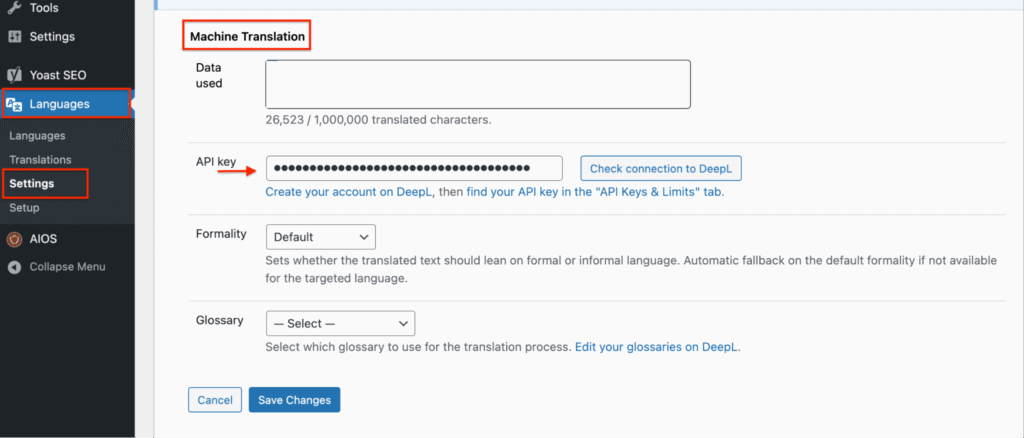
- Activate the automatic translation with Polylang Pro in Languages > Settings > Machine Translation. From there, add your DeepL API key.
- Open the page, post, or product you want to translate. We will translate the Privacy Policy, in our example.
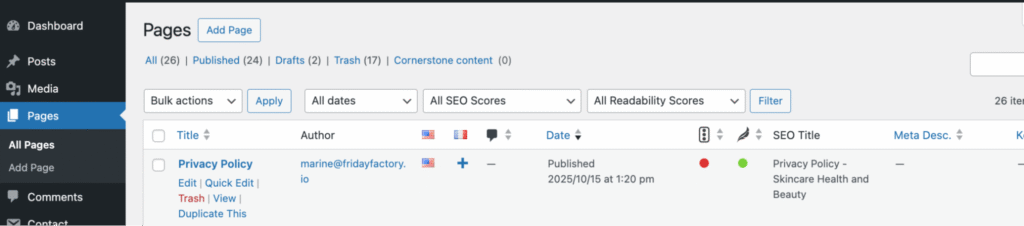
- Click the ‘+’ icon next to the language selection
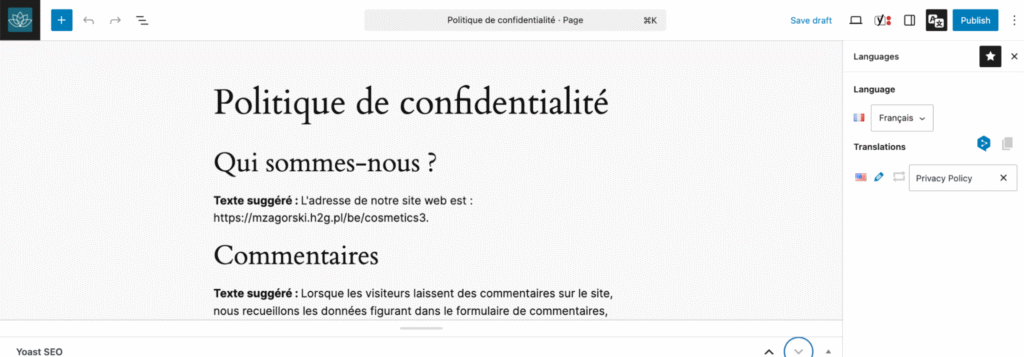
- Your translation will automatically appear in the target language (French in our case):
- Manually review and edit the translation to ensure accuracy and tone.
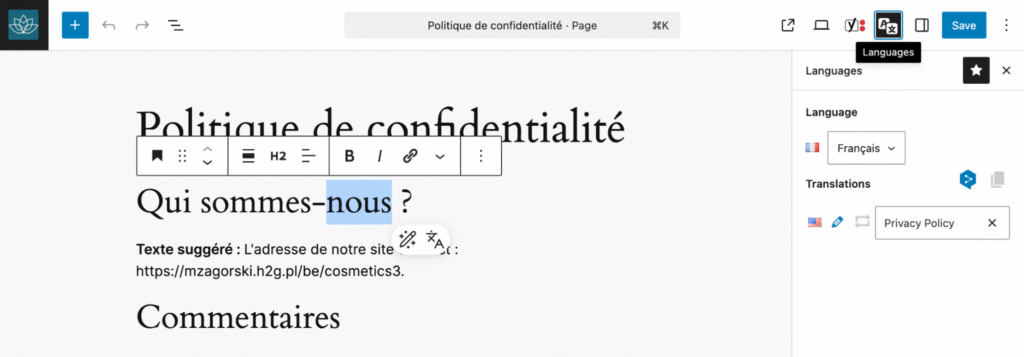
| 💡 Hint: With Polylang Pro, you can use AI translation (via DeepL), then edit and polish each translation without leaving WordPress |
So, here’s a quick recap of how Polylang Pro helps you go multilingual the easy way. It gives you everything you need to translate, manage, and grow your WordPress site in multiple languages without ever leaving your dashboard.
✅ Translate your content instantly with DeepL integration for fast, high-quality AI translations (free for up to 500,000 characters).
✅ Edit AI-generated translations manually, directly inside WordPress.
✅ Navigate a WordPress-friendly interface that feels simple, clean, and intuitive.
✅ Optimize your multilingual SEO automatically, including hreflang tags and clean URLs.
✅ Build seamlessly with full compatibility for the WordPress Site Editor.
✅ Expand your store globally with the Polylang for WooCommerce extension and sell abroad effortlessly.
Manual vs automatic vs hybrid: which one fits your project? (+ Summary table)
The right translation method depends on your goals, budget, and available time.
Golden rule: No matter the method, accuracy comes first. AI can save time, but only human review ensures your content sounds natural and trustworthy.
So which translation approach fits you best?
If you are a small business or blogger with a limited budget
Use AI translation for efficiency, then manually edit your key pages or hire a freelance translator for accuracy. This gives you a professional result without stretching your budget.
If you are a legal, finance, or medical company
Opt for manual translation more. If you use AI translation, you must have it reviewed by translators specialized in your field. Legal, financial, or medical terms require precision; a single translation mistake in your terms and conditions could cost you a case.
If you are an e-commerce owner, a large brand, or an agency
Adopt a hybrid approach. Start with AI to handle product descriptions at scale, then switch to manual translation for your top-selling products, terms and conditions, and delivery policies. Localize all this content to match each target country.
For complete brand consistency, go full manual. You can still use DeepL to create a first draft for your translators, but give them clear guidelines about localization, tone, and your international marketing goals.
If you are a curious marketer testing international potential
Start by translating only a few key pages with AI to see how your traffic reacts. If you notice an increase in visits from abroad, you may be ready to expand. Take the next step with manual translation for your top products, most visited pages, and the full checkout process. Don’t forget to localize currencies, payment gateways, and delivery options for each country.
How to choose between machine and automatic translation in 6 easy steps
Here’s a decision-making process that should help you find the perfect balance between manual and automatic translation.
Step 1. Calculate your true translation cost
Before you choose, calculate your word count and compare real costs.
Start by calculating your total word or character count. Include every post, page, and product description, then increase that number by 10-20% to cover menus, widgets, and plugin strings. Knowing your real word count helps you estimate translation costs accurately, whether you pay per word, per character, or per plugin usage.
Let’s break it down.
- Rate per word: it depends on the level of expertise required. General translators charge less, while specialists (legal, technical, or marketing experts) cost more.
| Level | Cost Range (per word) | Description / Use Cases |
| Low / basic | start at €0.05 | Simple, non-technical content (blogs, general pages) per word or for post-edit translation. |
| Mid / standard | €0.08-€0.20 | Regular content (web pages, marketing, general business), many agencies use €0.08/word as a baseline. |
| High / specialized | €0.20+ | Technical, legal, medical, or highly creative content. |
If you use a standard agency for general web content (not extremely technical), expect something around €0.07 to €0.12 per word. For highly specialized or legal content, costs can go much higher, possibly €0.15 to €0.25+ per word.
- AI translation costs: with Polylang Pro, DeepL offers up to 500,000 characters for free. Calculate any additional characters you may need beyond that.
- AI reviewer/ proofreader: consider using AI for the first draft, then hiring a proofreader instead of a translator. When asking for quotes, explain that the translation already exists and only needs human refinement.
- Marketing and design: who will handle your translated visuals, ads, and banners? Ask for a quote from an agency or a designer for creating multilingual assets.
- Plugin costs: include Polylang Pro or the Polylang Business Pack, depending on your setup. Other plugins can include: Wishlist for WooCommerce, or Curcy to add several currencies to your online store.
- Hosting: check whether your current plan can handle more traffic and international visitors. If not, consider upgrading your bandwidth or plan.
- CDN (Content Delivery Network): for faster loading times across countries, consider the cost of a global CDN.
| 📝 Here’s a simple formula to help you estimate your total translation costs accurately: Translation budget = rate per word + AI tool costs + proofreading or editing + marketing & design + plugin costs + hosting upgrades + CDN |
You can save it for later:
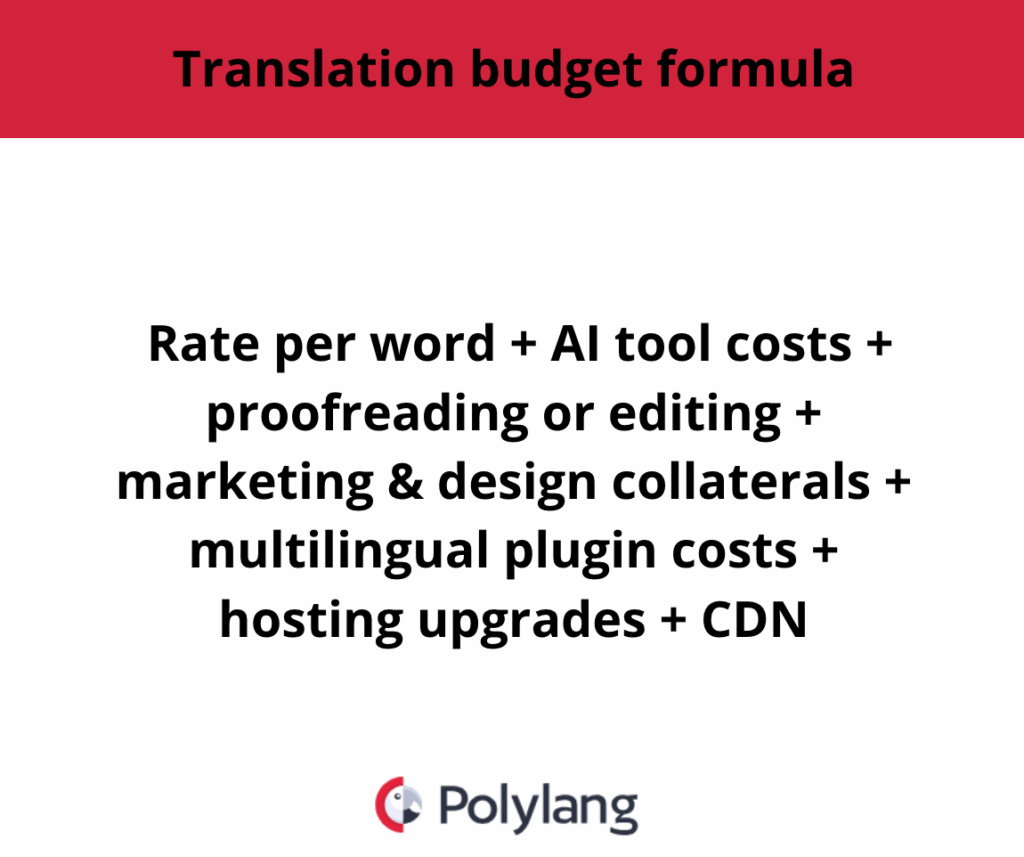
How to calculate your translation costs (formula)
Step 2. Check your analytics
Use analytics tools or your WordPress plugin dashboard to identify your top-performing pages or products. These are the ones that deserve special attention and manual review or even professional translation later on.
Step 3. Analyze your audience and top-performing content
Your schedule matters as much as your budget. If you have very limited time, go with automatic translation to get your multilingual site up and running fast. If you can afford more flexibility, choose a manual or hybrid approach to ensure higher quality, consistency, and a more natural tone across languages.
Step 4. Assess your language skills and in-house capacity
If you are bilingual, manual translation is doable. You can still use AI tools like DeepL to speed up the project, but in many cases, translating from scratch leads to a more natural and accurate result.
If you are not bilingual, use machine translation with manual editing capabilities and ask a native proofreader to review the output before publishing.
Step 5. Implement the hybrid strategy with Polylang Pro
If I had to translate a client’s website today, I would combine the best of both worlds: machine translation for efficiency and human translation for precision with Polylang Pro. It’s the simplest way to get a multilingual WordPress site, as it gives you full control of your multilingual WordPress site with both AI speed and human precision.
| 💡Hint: If you don’t have much budget or time, focus your manual translation efforts on your most valuable content, such as landing pages from ads, top-performing product pages, and any legal or brand materials. |
Step 6. Review, adjust, and maintain quality
Once your multilingual site is live, keep an eye on your analytics. Top-performing international pages are not always the same as those in your main language.
For example, your three best-selling products in France might not be the same ones that perform best in the UK. Identify what resonates in each market, then translate or refine those pages to boost conversions.
| 💡 Hint: Review your high-traffic pages and best-selling products every month, and make targeted manual translation improvements for the best results. |
Finally, to maintain quality and consistency, I suggest you keep improving your workflow by maintaining a multilingual glossary. You’ll have to update it regularly with new terminology, brand expressions, and corrections to ensure consistency across all languages, especially if you change translators or agencies.
| 💡 Hint: A glossary doesn’t need to be complicated. It can be a simple PDF where you list your brand terms, slogans, and tone of voice in several languages — or it can be integrated directly into your translation plugin. Polylang Pro will include a built-in glossary feature in version 3.8, making your translations even more accurate and consistent. |
Conclusion
Machine translation gives you speed. Manual translation gives you precision. The hybrid method gives you both.
With Polylang Pro, you get the best of both worlds: automation for speed and manual translation for accuracy, all inside the WordPress environment you already know! Start your hybrid translation today!