

Polylang 3.9 and Polylang Pro 3.9 introduce several new features and improvements. As this release includes many changes, we are presenting them across several articles. In this article, we focus on two highly requested improvements from the Polylang community. You can now manage multilingual content more easily directly from the WordPress posts list, with a new filter to identify untranslated posts and persistent language views with post counts. These improvements make it easier to monitor your content by language and quickly identify content that still needs to be translated.
Filter untranslated posts directly from the posts list
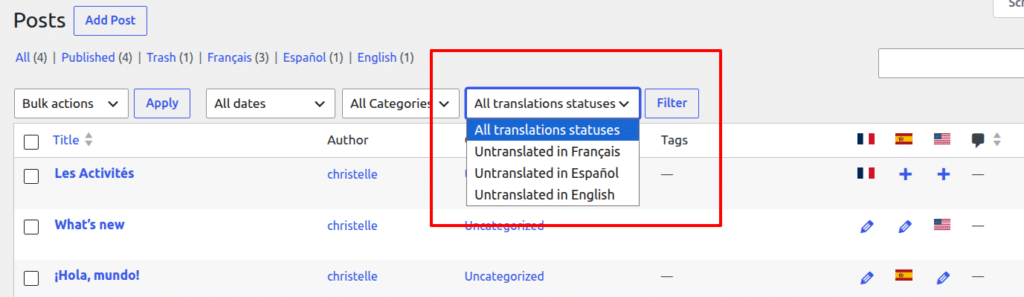
The 3.9 version adds a new filter to the posts list that lets you to display only posts that have not yet been translated into a selected language. This makes it easier to identify missing translations and focus on the content that still needs to be translated.
The filter is available directly above the posts list, so you can quickly select a language and see which posts are still untranslated without having to review your content manually.
View posts by language with post counts
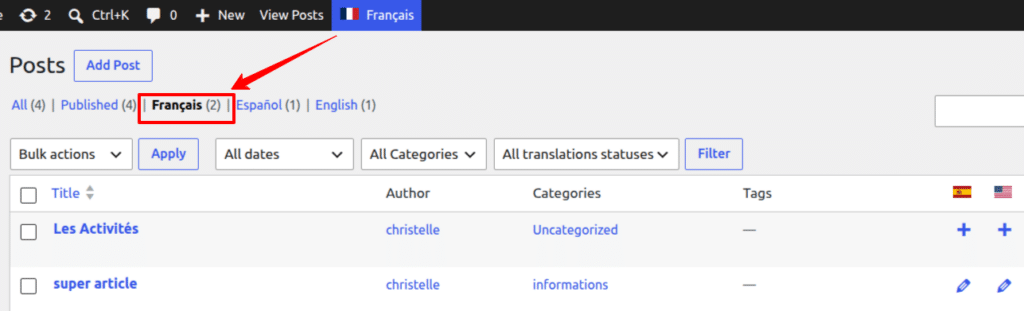
The 3.9 version also adds persistent language views to the posts list table. A view is displayed for each language, together with the number of posts available in that language, making it easier to monitor your multilingual content at a glance.
Language views can be combined with the existing WordPress status views, such as All, Published, and Draft. Unlike the language filter in the WordPress admin bar, these views are persistent and display the corresponding post counts, making it easier to compare the amount of content available in each language and quickly identify discrepancies.