


Polylang
Polylang Pro
Polylang Business Pack
Polylang 3.9 and Polylang Pro 3.9 introduce several new features and improvements. As this release includes many changes, we are presenting them across several articles. In this article, we focus on the complete redesign of the Language Switcher, with new customization options that give you more control over its appearance without requiring custom code. Depending on where you use the Language Switcher, you can choose different layouts, control how language labels and flags are displayed, and, for blocks, fine-tune the flag size, border radius, alignment, and spacing.
For more details, see the Language Switcher documentation.
The available options vary depending on the type of Language Switcher:
| Options & Settings | Classic Menu | Classic Widget (Classic Widgets) | Standard Block (Editor & Widgets) | Navigation Language Switcher Block (within Navigation Block ) |
| Integration Method | Appearance > Menus | Classic Widgets plugin | Block Editor / Appearance > Widget | Navigation block item |
| Layouts | Inline, Dropdown | Horizontal, Vertical, Dropdown, Selector | Horizontal, Vertical, Dropdown, Selector | Horizontal, Dropdown |
| Alignment | — | Left, Center, Right, Stretched | Left, Center, Right | — |
| Labels Display | None, Language names, Language codes | None, Language names, Language codes | None, Language names, Language codes | Language names, Language codes (None not available) |
| Display Flags | Yes | Yes | Yes | Yes |
| Flag Aspect | Landscape (3:2), Square (1:1) | Landscape (3:2), Square (1:1) | Landscape (3:2), Square (1:1) | Landscape (3:2), Square (1:1) |
| Border Radius | — | — | Yes | Yes |
| Flag Size | — | — | Yes (with unit selection) | Yes (with unit selection) |
| Label Spacing | — | — | Yes | Yes |
These new options make it easier to adapt the Language Switcher to your website’s design, whether you use a classic menu or widget, or one of the new block-based Language Switchers.
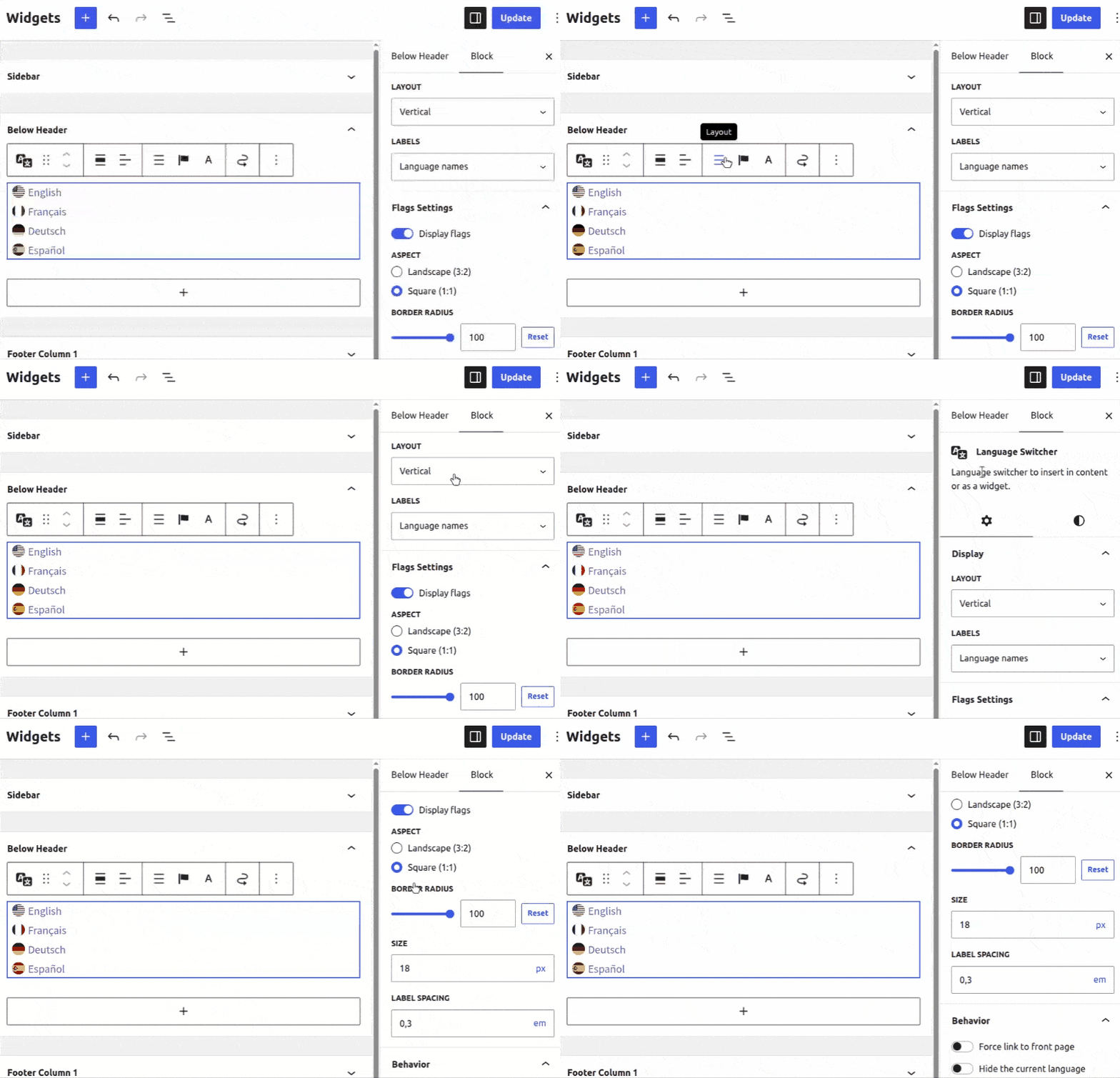
In the example below, we use the Language Switcher block in the Appearance > Widgets block editor to demonstrate the new customization options.
Up to now the flags provided by default were PNG images. The main advantage was the very small weight – less than 75k for a total of 249 flags. This however comes with the downside that PNG images cannot be resized without looking ugly.
Allowing customization how the flags look requires using SVG flags. It was already possible to use custom SVG flags for years but Polylang didn’t provide them by default. The main drawback is that some SVG flags have a huge weighs. For example, the flag of Spain available on Wikipedia weighs more than 150k. Only one SVG flag weighs twice more than all Polylang PNG flags. Even if the compression reduces this during transfer, this was a no go for performance reasons.
And we care about performance… So we decided to release our own flag set, optimized for small sizes. Let’s say less than 100px, which should be perfect for most web usages, even if most of them will look good at bigger sizes. In this new set, the average image weight is less than 0.5k. All are less than 2k. In detail, all these new flags have all an aspect ratio of 3:2 and will be displayed in 18px x 12px by default. Note that this is different from the old PNG flags which had a size of 16px x 11px. This may have a small design impact on existing language switchers when updating to Polylang 3.9.
It’s worth noting that not all flags present in the old set have been redesigned. Some are missing. But hopefully we didn’t miss the most used flags. A contrario, obsolete flags have been updated and new regional flags are provided to better represent regional languages.
If for some reason, you want to keep using the old flags, it’s possible to download them from GitHub and use them as custom flags.