


Polylang Pro 3.8 introduces meaningful improvements for multilingual WordPress sites. This release focuses on finer permission management, a more unified block experience across Polylang and Polylang Pro, WP-CLI integration for developers, and better control over the DeepL glossary for machine translation.
If you manage multilingual editorial teams, deploy sites at scale, or rely on DeepL for automatic translation, this update is designed to improve your daily workflow.
Here is a clear overview of what’s new in Polylang Pro 3.8.
Introducing language permissions and capabilities (Polylang Pro + User Role Editor plugin)
The new capabilities feature lets you precisely control who can manage languages, translations, and automatic translations on your multilingual site. Administrators can now add capabilities and restrict access so users can edit only specific languages.
⚠️ And just a little heads-up, to use this feature, you’ll also need the popular and free User Role Editor plugin.
Ready? Let’s go over the new capabilities.
1. Restrict editing by language
This capability allows you to determine which languages a specific user can edit. A capability can be generated per language using the following format:
- Capability name: translate_{language_slug}
For example, if you want to allow a user to edit the French content only, you can add the following capability: translate_fr
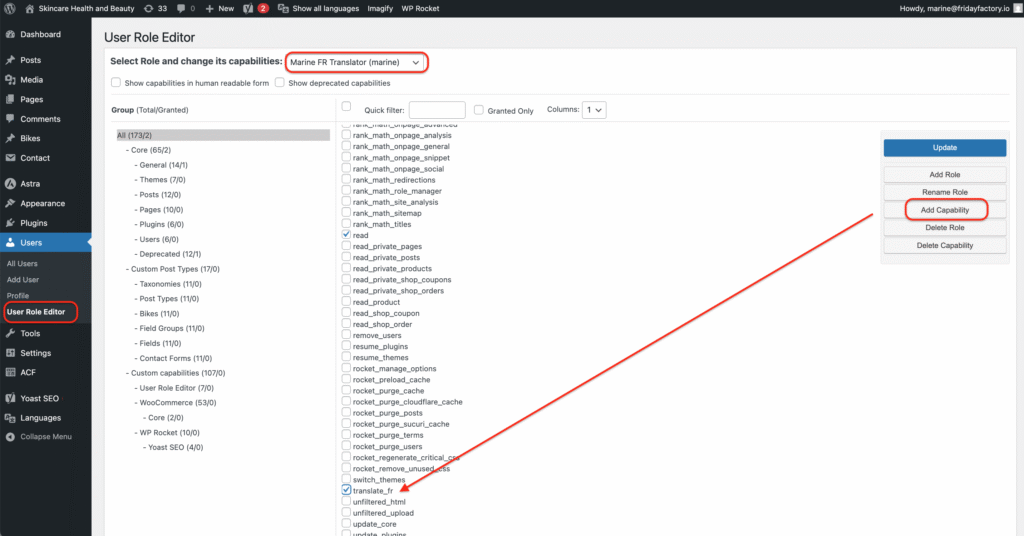
What does it mean in terms of restrictions and capabilities for this specific French translator?
The French translator has the translate_fr capability assigned to their role and will no longer be able to edit any other languages (e.g., English content). Edit icons and synchronisation tools will also be automatically disabled for languages they are not authorized to manage.
That was an example for French, but of course, if you want to restrict access to English or Italian instead, the capabilities will look like this. All you need to do is update the language code.
| Language restriction | Capability + language code |
| English | translate_en |
| Italian | translate_it |
2. Control access to machine translation
This new capability allows you to decide which users are authorized to create automatic translations via DeepL. You can now control precisely who can generate machine translations, helping maintain consistency and oversight within your translation process.
- Capability name: machine_translate
📌 However, this capability requires adding the following constant to your wp-config.php file first to work: define( 'PLL_ENABLE_MACHINE_TRANSLATION_CAPABILITIES', true ); |
3. Delegate access to string translations
Previously, only administrators could access string translations from Polylang’s Translations panel. With this capability, you can grant selected users access to manage translations without giving them full administrator rights.
- Capability name: manage_translations
4. Manage languages without full administrator access
This capability provides access to the languages table and the Languages REST API. You can allow a translator to create a new language for example, while keeping overall administrative control of the site.
- Capability name: manage_languages
| 🔍 Ready to test? Check how to manage capabilities with Polylang Pro in our dedicated documentation. |
Language and settings management via WP-CLI (Polylang Pro)
For those who prefer working from the command line, Polylang Pro 3.8 also introduces a long-awaited feature: WP-CLI integration. We’re reaching a new milestone for developers and WordPress agencies that regularly deploy multilingual websites and need reliable automation from the WP-CLI ecosystem.
+----------+------+--------+---------+-------+-----------+--------+---------+
| name     | slug | locale | term_id | order | direction | active | default |
+----------+------+--------+---------+-------+-----------+--------+---------+
| English  | en   | en_US  | 3       | 0     | ltr       | true   | true    |
| Français | fr   | fr_FR  | 6       | 0     | ltr       | true   | false   |
+----------+------+--------+---------+-------+-----------+--------+---------+
$ wp pll language create es_ES
Success: Language "Español" (es) created successfully.
$ wp pll language list
+----------+------+--------+---------+-------+-----------+--------+---------+
| name     | slug | locale | term_id | order | direction | active | default |
+----------+------+--------+---------+-------+-----------+--------+---------+
| English  | en   | en_US  | 3       | 0     | ltr       | true   | true    |
| Français | fr   | fr_FR  | 6       | 0     | ltr       | true   | false   |
| Español  | es   | es_ES  | 20      | 0     | ltr       | true   | false   |
+----------+------+--------+---------+-------+-----------+--------+---------+
$ wp pll language update es --name="spanish"
Success: Language "spanish" (es) updated successfully.
$ wp pll language list
+----------+------+--------+---------+-------+-----------+--------+---------+
| name     | slug | locale | term_id | order | direction | active | default |
+----------+------+--------+---------+-------+-----------+--------+---------+
| English  | en   | en_US  | 3       | 0     | ltr       | true   | true    |
| Français | fr   | fr_FR  | 6       | 0     | ltr       | true   | false   |
| spanish  | es   | es_ES  | 20      | 0     | ltr       | true   | false   |
+----------+------+--------+---------+-------+-----------+--------+---------+
For example, here’s what is available right now:
- Full language management: Create, modify, delete, or list site languages without opening the WordPress admin interface (wp pll language commands).
- Complete settings control: Configure all Polylang options, retrieve them, or reset them directly from the terminal (wp pll setting commands).
This enables a full multilingual setup and configuration without opening the WordPress admin interface, a major efficiency gain for large-scale deployments.
Beyond automation, we have also improved how automatic translations behave. Polylang Pro 3.8 introduces more precise control over DeepL glossary usage, helping ensure terminology consistency across your multilingual content.
DeepL glossary selection (Polylang Pro)
This one is for our DeepL lovers who asked for more control over glossary usage. Until now, Polylang Pro has not allowed selecting a specific DeepL glossary.
With 3.8, a new setting lets you choose which DeepL glossary to apply to automatic translations. You can:
- Use existing DeepL glossaries.
- Select the glossary to use for your site.
- Ensure consistent terminology across translations.
| 🔍 Ready to test? Learn how to select a specific DeepL Glossary with Polylang Pro. |
Beyond permissions and workflow control, we have also improved the language switcher experience. Let’s go over the next new feature that unifies the experience between Polylang and Polylang Pro.
Language switcher blocks are now available in Polylang
The Language Switcher Block and the Navigation Language Switcher Block, previously exclusive to Polylang Pro, are now available for free directly in Polylang. These blocks allow you to easily insert a language selector inside pages, posts, or navigation menus.
| 📌 Developers, here’s an important note. Polylang Pro no longer maintains separate block-specific code. The Pro version now inherits block functionality directly from Polylang. |
With these improvements, integrating and managing language selection becomes more consistent across users.
Try Polylang Pro 3.8 and share your feedback
Polylang Pro 3.8 strengthens permission management, introduces WP-CLI automation, improves DeepL glossary control, and simplifies language switcher block integration in Polylang (the version available on WordPress.org). Each of these improvements is designed to make multilingual site management clearer and more efficient for your translators and teams.
We’d love to hear your thoughts! If you encounter an issue, suspect a bug, or have suggestions for improvement, please open a support ticket.
Thank you for being part of the Polylang community and for using our multilingual solution.