

Polylang Business Pack
All the power of Polylang Pro combined with Polylang for WooCommerce.
The more you get, the less you pay:
Polylang Business Pack is subject to a yearly license. Renewals currently benefit from a 50% discount rate and include updates and professional support.

Rating

4.7/5 (2982 votes)
Current version
3.8.6
Last update
July 20, 2026
Active installations
+800.000
Introducing the Polylang Business Pack:
Polylang Pro + Polylang for WooCommerce. Get the best of both worlds in one bundle and save money!
Get access to a complete solution for translating your WooCommerce site along with the premium features of Polylang Pro, such as a better translation workflow, access to Machine Translation, and URL translation.
fits perfectly for:
WordPress agencies, developers, and WooCommerce store owners who want to translate their shops and gain access to Polylang’s Pro features.
This combo offers the best value for money!

Machine Translation

WooCommerce Integration

SEO-Ready
HPOS-Ready

Built-in Performance
Translate Easily Your WooCommerce Store
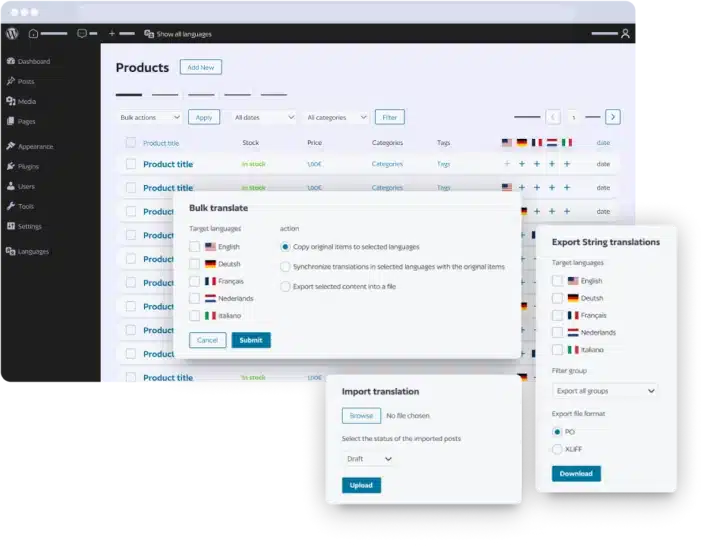
Make your WooCommerce store multilingual and reach new markets. Your stock is synchronized across languages, and you can translate your online shop, such as:
- All product types.
- Categories, tags, and global attributes.
- WooCommerce Emails (Subjects and Headings only).
- Default WooCommerce emails (if the WooCommerce language packs are available).
- Essential WooCommerce pages: Shop, My Account, Cart, and Checkout.
Access to Manual and Machine Translation
Save some precious time by translating your WooCommerce store with our DeepL Integration.
- Speed up your translation process.
- Use DeepL directly from the post, page, and product interface.
- 30+ languages available from DeepL.
- Benefit from DeepL’s high accuracy.
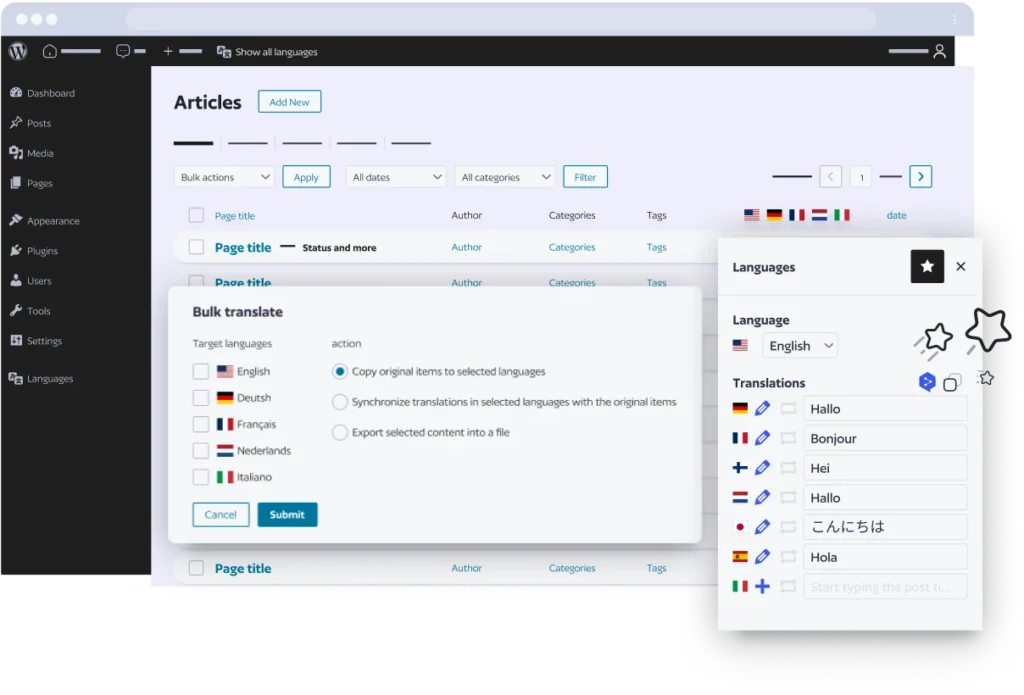
Unlock the Power of Polylang Pro
Easily translate the rest of your site and unlock all the Polylang Pro features:
- Machine Translation (DeepL Integration).
- Duplicate a product and its translations in just one click.
- XLIFF Import/Export.
- URL and slug Translation.
- Share slug across translations.
- Premium Support.
Key Features
All the Awesomeness of Polylang Pro with Polylang for WooCommerce

Machine Translation with DeepL
Translate pages, posts, products, categories, and tags using our powerful DeepL integration. ⚠️ Currently not compatible with Elementor and some builders. Contact us for builder support. Note: Polylang Pro does not provide a one-click “translate everything” feature.

Manual Translation
Duplicate products, posts, and pages across languages and translate manually, including media, widgets, and menus.

Translate WooCommerce Products
Translate simple, variable, and grouped products.
Translate Products Categories and Tags
Ensure seamless translation of products categories and tags.
Translate Global Attributes
Extend translation capabilities to global attributes.
Translate WooCommerce Pages
The shop, account, cart, and checkout pages are automatically translated by loading translations from the WooCommerce language Packs.

Send WooCommerce Emails in the Receiver’s Language
Send emails in the customer’s language, including default WooCommerce emails like order confirmations. If your WordPress user’s language is in the Polylang Language table, you will receive emails, such as new sale notifications, in your own language.

Stock Synchronization Across Product Translations
Ensure consistency in stock levels across translated products.
Other Content Synchronization
Synchronize categories, tags, shipping classes, attributes, images, and galleries.
HPOS Ready
Full compatibility with the High-Performance Order Storage feature, ensuring fast performance.

SEO-Ready
Hreflang tags implementation, keyword, and meta description translation (with Yoast SEO) to improve the ranking of your WooCommerce store.

Flexible Language Switcher
Easily switch between languages, add flags, and display your switcher anywhere on your site, such as menus, footers, and widgets.

Detect Browser Language
Detect and display content based on the user’s browser language preference.

Flexible Language URL configuration
Choose from subdirectories, subdomains, or separate domains for each language, e.g., “yourstore.com/fr/,” “fr.yourstore.com,” and “yourstore.fr”.

URL Translations
Allow translations to share the same slug in the URL or translate slugs.

Block Editor and Site Editing Support
Full integration with the WordPress block editor and site editing functionalities.

XLIFF Import/Export
Streamline translation tasks with easy importing and exporting capabilities, which is ideal for translators.

Developer-Friendly
Compatibility with WPML API and REST API support, perfect for developers willing to expand Polylang.

Built-in Performance
Bloat-free interface designed within the WordPress and WooCommerce admin. Ideal for performance and meeting Core Web Vitals standards.

Professional Support
We offer professional assistance in English and French from Monday to Friday.
Compare with Polylang Business Pack

|
Compare with From / yr |
From / yr |
||
|---|---|---|---|---|
| DeepL Machine Translation integration (your own API key required) | ||||
| Translate your content automatically in the post or page interface (in edition mode). ⚠️ Currently not compatible with Elementor. |

Loading…
|
|
||
| Translate your content with DeepL. Check that your language is supported on DeepL’s website |
Loading…
|
|
||
| User-friendliness | ||||
| Benefit from our intuitive interface |
Loading…
|
|
||
| Easy start with our installation wizard |
Loading…
|
|
||
| Translate your content | ||||
| Translate menus and widgets |
Loading…
|
|
||
| Translate slugs in URLs (custom post types, taxonomies and more) |
Loading…
|
|
||
| Duplicate the content when creating a translation |
Loading…
|
|
||
| Translate custom post types and custom taxonomies |
Loading…
|
|
||
| Translate posts, pages, media, categories, tags |
Loading…
|
|
||
| Translations can share the same slug in the URL |
Loading…
|
|
||
| Synchronized posts to get the same content across translated posts, pages |
Loading…
|
|
||
| Setup a multilingual website | ||||
| Enable or disable languages |
Loading…
|
|
||
| Use subdirectories, subdomains or separate domains |
Loading…
|
|
||
| Import/Export of strings translations in PO or XLIFF format |
Loading…
|
|
||
| XLIFF Import/Export for pages, posts, media |
Loading…
|
|
||
| Add a language switcher |
Loading…
|
|
||
| WooCommerce integration | ||||
| Translate products, categories, tags, global attributes |
Loading…
|
|
||
| Duplicate a product and its translations in 1 click |
Loading…
|
|
||
| HPOS ready |
Loading…
|
|
||
| Synchronisation of the cart across languages |
Loading…
|
|
||
| Synchronization of taxonomies, attributes, metadata across product translations |
Loading…
|
|
||
| Translate WooCommerce emails |
Loading…
|
|
||
| Translate WooCommerce pages (Shop, Cart, Checkout, My Account) |
Loading…
|
|
||
| Other features and compatibilities | ||||
| Additional integration with ACF Pro |
Loading…
|
|
||
| REST API Support |
Loading…
|
|
||
| Site Editing support |
Loading…
|
|
||
| WPML API compatibility |
Loading…
|
|
||
| Help and support | ||||
| Community support on wordpress.org |
Loading…
|
|
||
| Access to the documentation and guides |
Loading…
|
|
||
| Premium professional support |
Loading…
|
|
||

Do you have any questions?
-
Is Polylang GDPR compliant?

Since the version 4.9.6, WordPress allows to export personal data. This includes the biographical info. As Polylang and Polylang Pro allow the users to translate their biographical info, the translations are added to the exported data since the version 2.3.6.
None of our plugins collect other personal data.
-
Is Polylang compatible with the EU cookie law?
Polylang uses a cookie to remember the language selected by the user when he comes back to visit again the website. This cookie is also used to get the language information when not available in another way. Examples are ajax requests or the login page.
According to the section 3.6 of the Opinion 04/2012 on Cookie Consent Exemption, this cookie is part of the user interface customization and may be considered as requested by the user. Whether it requires the explicit consent of the user seems to depend on the expiration time or the information provided on your website. Moreover European countries have all their own law and do not apply the European directive the same way. Please check if this cookie requires an explicit user consent in your own country.
Here are the information about the cookie used by Polylang:
- Default name:
pll_language, can be changed by setting the constantPLL_COOKIE - Value: the language code of the last browsed page
- Default expiration time: 1 year, can be changed with the filter
pll_cookie_expiration
It is possible not to use the cookie (be aware however that in this case and as stated above, not everything will work correctly) by putting the code below for example in your wp-config.php file:
define( 'PLL_COOKIE', false); - Default name:
-
Do I need another license key for staging sites and localhost?
No. You can buy only one license key per public site and use it for localhost and your staging site. Your test site url has however to match:
- localhost
- localhost.localdomain
- 10.0.0.0/8
- 172.16.0.0/12
- 192.168.0.0/16
- URLs ending with:
- .dev
- .local
- .test
- .lndo.site
- .ddev.site
- .localhost
- .ddev.site
- URLs starting with:
- dev.
- stage.
- staging.
- preprod.
- sandbox.
- test.
- local.
- Specific domains:
- .wpserveur.net
- .wpengine.com
- .wpenginepowered.com
- .wptiger.fr
- .myraidbox.de
- .lndo.site
- .go-vip.net
- .kinsta.cloud
- .elementor.cloud
- .cloudnet.cloud
- .wpcomstaging.com
- .mystagingwebsite.com (Pressable.com)
- .pantheonsite.io
- .hostinger.site
All URLs matching the rules above will not be counted against your limit of sites. If you have any problem, please contact our support.
-
What is the duration of a license key?
A license key is necessary to obtain the automatic updates and to access to the helpdesk support.
A license key is valid for one year as from the date of purchase. It may be renewed after one year at a preferential rate (currently 50% of the new license price). If a key is not renewed prior to its expiration, the plugin will continue to operate but you will no longer have access to automatic updates and helpdesk support.
It is recommended to run the latest version of WordPress, your theme and your plugins.
-
What is covered by the support?
Per our general terms and conditions of sale, the support includes the assistance with the installation and use of our plugins. It of course includes the correction of bugs. It does not include the resolution of conflicts with theme or third party plugins. It does not include writing personalized code to fix a problem. It does not include reviewing or fixing personalized code written by the client. No support will be due in the event of a modification of the plugin by the client.
-
What is your refund policy?
If you have problems getting your purchased plugin to work, we will be happy to provide a full refund within 30 days of the original purchase.
Before a refund will be granted, you must allow us to try to solve your problem by opening a support ticket.
After 30 days, no refunds will be given.
Refunds do not apply to license upgrades or renewals.